Hi startuphome,
If you're sending push notifications on a daily basis, by now you know that...
You can send your push notifications to: But sending a push notification to everyone costs you.
For one thing, everyone doesn't find the same things interesting.
Then, there's the matter of sending volume.
Every PushEngage account comes with its own sending volume.
This means that there's a limit to how many push notifications you can send every month.
And if you spend it all on push notifications that aren't targeted, you can send fewer push notification campaigns in a month. One of the simplest ways to create subscriber segments is to organize leads based on what kind of content they browse. And this is super easy to set up from your PushEngage dashboard.
Head over to Audience » Segments and click on Create a New Segment:
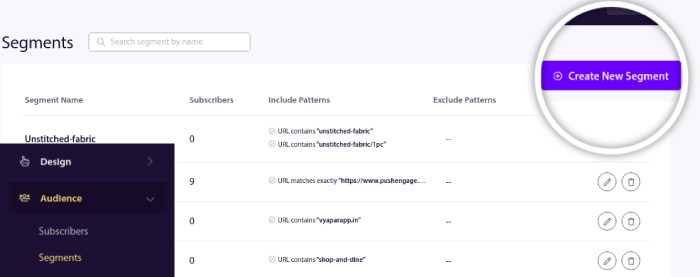
And create a rule that segments your subscribers automatically based on the URLs they're browsing:
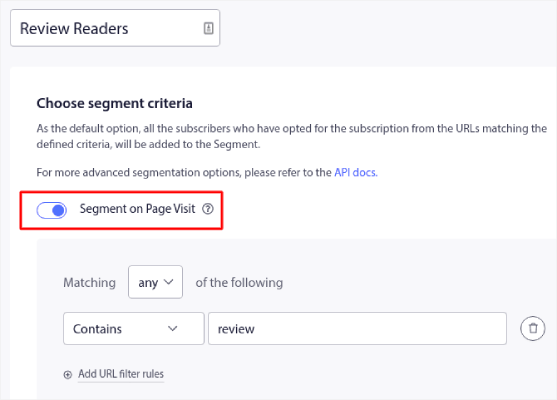
And it's that simple.
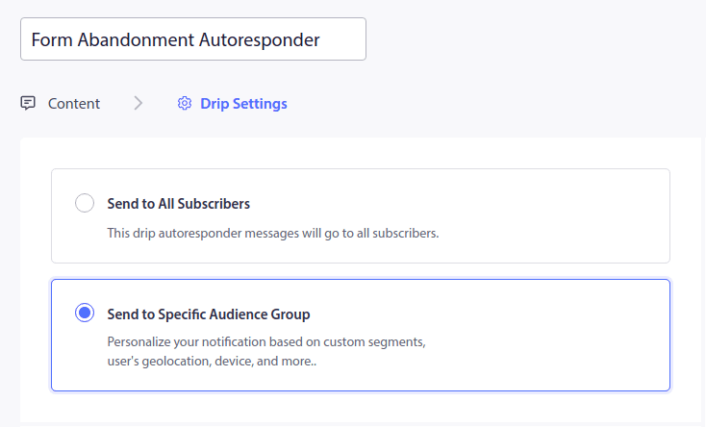
When you send a push notification, you can choose which segment to target:
There are other ways to segment your subscribers.
If you're not sure how to get that done, check out this article on how to segment your subscribers.
See you on the inside. Love and luck,
Nirvana Guha
Product Educator at PushEngage | 

