Hi startuphome,
Getting new push notification subscribers is a challenge.
And most push notification optins appear within 5 seconds of landing on your site.
That's not enough time for your visitors to find a real reason to subscribe to your push notifications.
You're likely losing 50% of your potential subscribers because of this problem.
Thankfully, there's a small hack to work around this issue if you act in the next 10 minutes.
You can create a push notification subscription widget for your site.
Like this one:
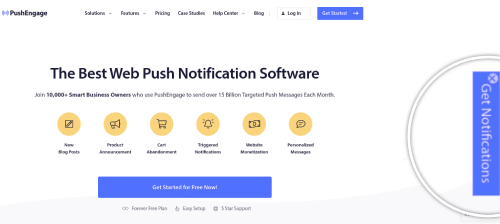
Head over to your PushEngage dashboard.
Then, go to Design » Widgets:
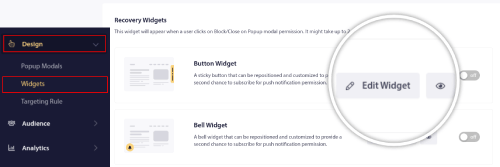
Under Recovery Widgets, you'll see two options: - Button widget
- Bell widget
Choose whichever widget suits your site's design language better.
These widgets are meant to help you recover lost subscriptions from push notification optins that didn't convert.
Click the Edit Widget button on whatever widget you choose.
We're going to use the button widget for this email, but it's the same with bell widgets as well.
In the next screen, you'll see options to edit the widget.
You can set a delay for the widget to show up:
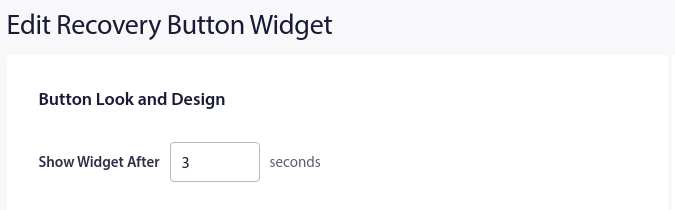
We recommend a minimum 3 second delay before you show the widget on your site.
Next, you can edit the button label for the widget under Button Label:

And select the color scheme for the widget so that it's on-brand:
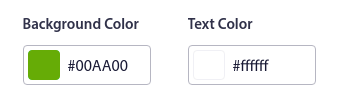
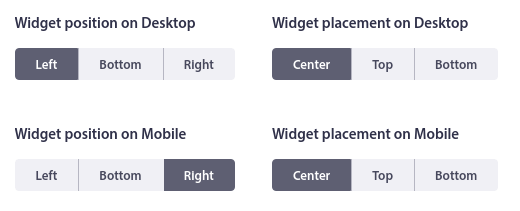
You can also select the perfect placement for the button on mobile and desktop devices:
And when you're done, click on the Save Changes button.
If you followed every step in this newsletter, you will now have a widget on your site to recover lost subscriptions for your push notification campaigns.
Like this one:
Reply to this email with screenshots of your widgets if you liked this tutorial! 😊
Love and luck,
Nirvana Guha
Product Educator at PushEngage | |


