Hi startuphome,
If you're using push notifications to grow your business, you'll know this...
A HUGE number of website visitors that see your push notification optin don't click and subscribe.
In your PushEngage dashboard, head over to Analytics » Opt-in Analytics and you'll see something like this:
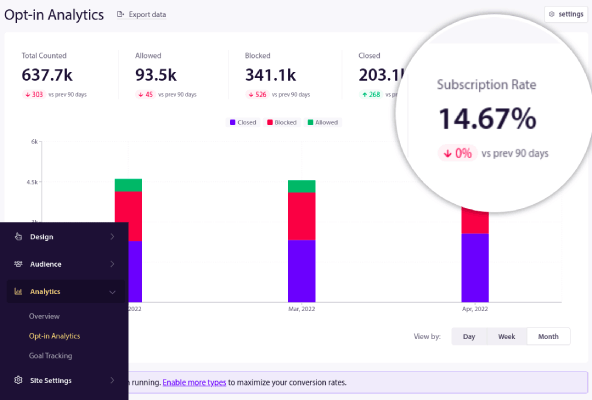
Now, 14% is a fairly high optin rate. But that still means that 86% of our site visitors aren't subscribed for our push notifications!
Why does this happen?
Is your popup modal just bad?
Are your visitors annoyed by the popup?
It's really not your fault. The truth of the matter is that most of the time, it's just bad timing.
Most push notification optins show up the exact moment that visitors land on a page.
And that's not enough time for anyone to decide if they want to subscribe to you.
So, they'll hit the Close button.
And later, when they DO have a reason to subscribe, the push notification optin is nowhere to be seen!
That's exactly why we launched a new feature to create multiple optins at the same time.
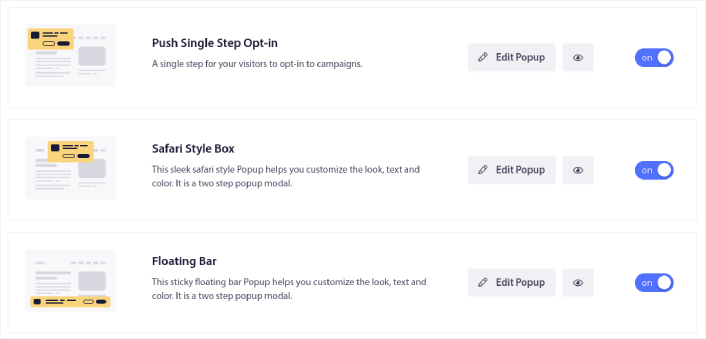
The trick is to use the Delay feature to make your popups show up exactly when you need it.
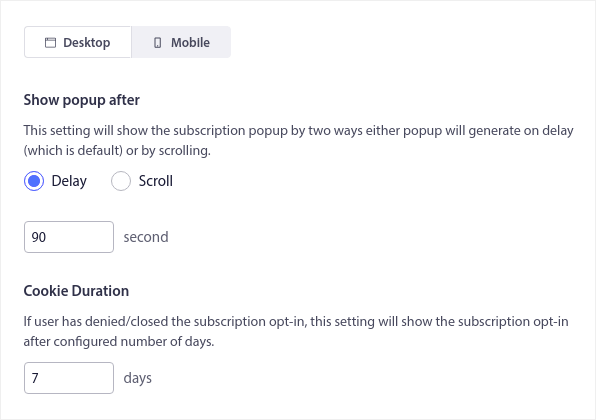
Click on the Edit Popup button next to your popup modal and set a custom delay (in seconds) up to a maximum of 1 hour or 3600 seconds:
Before you get to the Design Options, you should customize your optin.
Just putting in some basic effort to customize the way your popup looks can increase your optin rates by up to 50%!
Check out this article and set up your optin right now.
Love and luck,
Nirvana Guha
Product Educator at PushEngage
P.S.: If you missed our last newsletter, you can now automatically segment your push notification subscribers using the Large Safari Style Optin with Segments in PushEngage. We highly recommend setting one up right now. | |


