Hi, startuphome,
Things are moving super fast at PushEngage.
We launched a major feature overhaul in our popup modals a few weeks ago.
You can now create a Large Safari Style Optin with Segments to collect push notification subscribers.
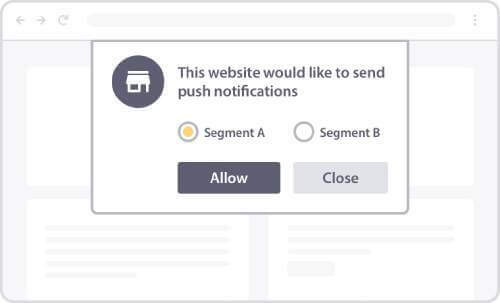
You can use this optin to automatically segment your subscribers.
But what does that even mean?
Here's the deal: Not all your push notification subscribers will want to see the same type of content from you.
So, a really cool way to engage with your subscribers and be super relevant is...
To break up your subscriber list into multiple "segments" based on what they're interested in.
You can then send messages to each segment based on their likes and interests.
And that's where our new popup modal comes into play.
With this new optin, you can automate the entire process of: - Collecting push notification subscribers
- Segmenting subscribers instantly
But let's dial things back a little.
Are you even creating segments for your push notification subscribers?
If not, you need to start right now.
Push notifications that target subscribers using segments get 50% higher click-through rates!
You also get 39% higher retention rates for paying customers.
Don't worry. It's super easy to set up.
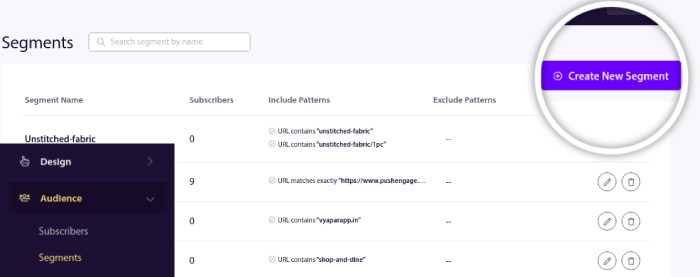
Head over to the PushEngage dashboard.
Then, go to Audience » Segments and click on Create a New Segment:
And enable Segment on Page Visit:
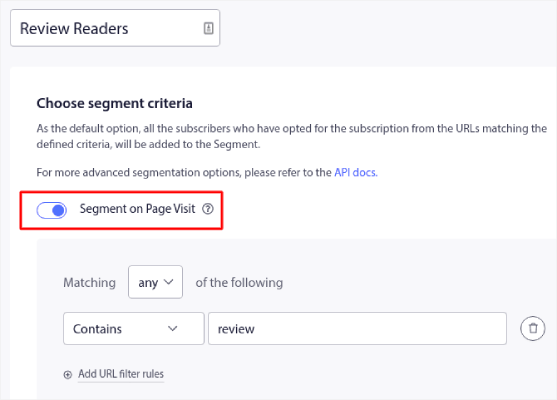
In our example, we just created a segment for review readers.
Now, if any of our subscribers land on any page with the word "review" in the URL, they'll get automatically added to this segment.
It's as simple as that!
But what if you want your website visitors to tell you what segments they should be placed into?
That's when you use the Large Safari style popup modal with segments.
You give your site visitors options to select the kind of content they're interested in right when they're subscribing to your push notifications.
Setting up the popup modal is super easy to do.
Check out this article and set up your optin right now.
Love and luck,
Nirvana Guha
Product Educator at PushEngage
P.S.: Test out your optin. PushEngage's new dashboard update enables you create multiple push notification optins on your site. Most small businesses grow only by testing multiple ideas. If you get some epic results, drop a comment and let us know your success stories. | |


